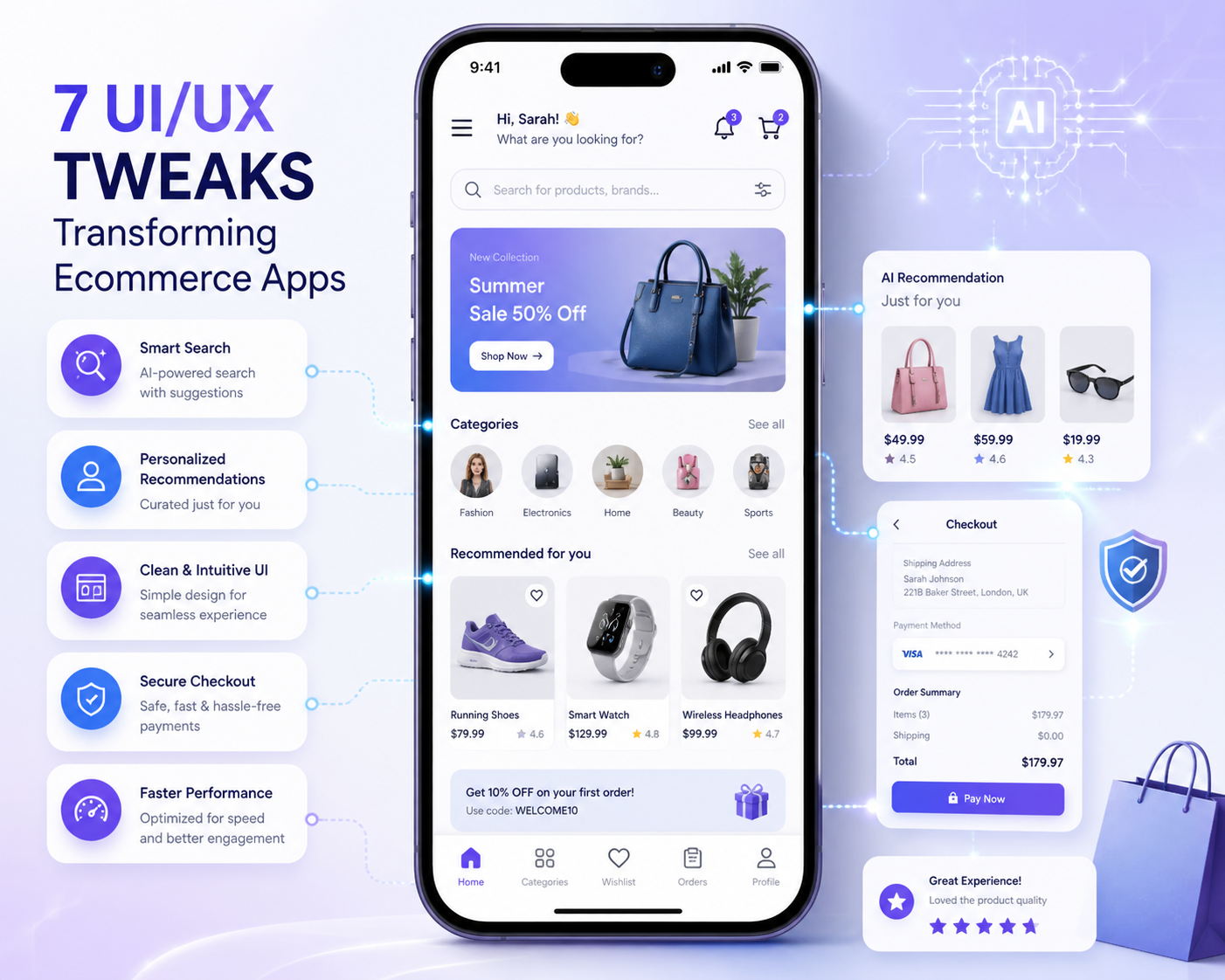
7 UI/UX Tweaks That Will Revolutionize Your Ecommerce App
Now Days, the user experience is impotent to the success of any ecommerce platform whatever it is website or app. In today’s competitive environment with shrinking attention spans, even a small point of friction can result in cart abandonment. This is where a good UI/UX design is important not only for aesthetics but also for usability, trust and conversion.
Developing an ecommerce app today means more than just creating functional interfaces. It’s now about creating natural, personalized and AI-supported services that meet user expectations. Digital storefronts must evolve their design strategies to match user behavior.
Many businesses looking to develop ecommerce apps are finding that design is not an endpoint layer, but a strategic foundation. The navigation flow, micro-interactions – everything is designed to guide users to the actions you want them to take.
When you hire an ecommerce app development company, the teams often focus on scalability and functionality. But small UI/UX improvements can really make a difference in engagement and retention results.
In this article, we will explore 7 powerful UI/UX modifications that can change your ecommerce app and bring it closer to what users expect in today’s AI driven digital world.
1. Navigation Easier with Predictive Search
Why it matters
Users want to discover products fast. If the navigation structure is complex, you’re more likely to frustrate visitors and have them drop off this monitors user behavior, search history, and what is currently trending, then provides relevant results in real time.
Effect
- shortens search time
- Increases product exposure
- Increases total user satisfaction
This is especially useful for large scale platforms offering online store app development services, where the product catalogs can be massive and difficult to browse manually.
2. Micro-Interactions on Product Page
The Importance
Static product pages do not delight users. Interactive elements can really improve the browsing experience.
The Change
Include small interactions such as:
- Hover effects for product images
- Animated Buttons Add To Cart Add To Cart
- Stock prices in real time
- Impact
- Gives a dynamic feeling
- Encourages user interaction
- Helps build confidence in buying decisions
AI is able to go a step more and give interactive advice based on user needs to make the product page feel personalized.
3. Batter Autofill for Quicker Checkout for Customer
The reason it is important
Checkout friction is one of the primary reasons for cart abandonment.
The changes are:
- Use AI powered autofill for batter UI/UX:
- Provide addresses
- Secure storage of payment preferences
- Checkout made easy with one-tap
Effect
- Reduces tirednes
- speed up transactions
- Boosts conversion rates
AI is able to go a step more and give interactive advice based on user needs to make the product page feel personalized.
4. Customize user journeys using AI suggestions
Why this matters
Users no longer find generic experiences satisfactory. Personalization is the most important driver of engagement.
Tweak Use A.I. algorithms to:
- Suggest products that match your browsing history
- Curated collections
- Display personalized offers
Impact
- Increases average order value
- Increases repeat visits
- Creates user loyalty
This is especially useful in developing B2C eCommerce apps where individual customer behaviour directly affects revenue results.
5. Design for Mobile First
Why it counts
Most of the ecommerce traffic is now coming from mobile devices.
The Shift
Adopt a mobile-first design approach by:
- Thumb-friendly navigation
- Fast loading speed
- Focus on core content
Impact
- Improved access
- Boost user stickiness
- Reflects current browsing habits
As a designer you can’t just throw a shopping app together for iOS and Android. “You have to think about the platform guidelines and give them a consistent experience across devices.
6. Facilitate multi-vendors
Why It Matters
Marketplaces are getting more and more popular but having lots of sellers can be confusing for the user.
The changes
Provide a common interface for users to:
- Shop easily from other vendors
- Check prices & reviews
- “Obey your orders in this place.
Effect
- Simplifies complex ecosystems.
- Earns trust by being transparent
- Increase engagement
This is particularly important for platforms that are designed to be a multi-vendor eCommerce app, where clarity and consistency are paramount to user satisfaction.
7. Performance Optimization Powered by AI
Why is this important?
Speed and performance directly impact user retention and search rankings.
The Mod
Use AI to:
- Image optimization Loading…
- Users will pre-load content
- Identify and eliminate performance bottlenecks
Impact
- Fewer bouncing people
- Smooth navigation improved
- Improves overall app efficiency
These enhancements are often found in advanced mobile commerce app solutions where the performance is scalable with user demand.
The Impact of AI on UI/UX Design Today
Artificial intelligence is changing the way we build and use ecommerce apps. AI gives us an unprecedented level of intelligence – chatbots, recommendation engines.
Major Contributions of AI:
- Behavioral analytics for deeper insights
- Real-time personalization
- Voice and visual search functions
- Automating UI A/B testing for enhancements
- “AI isn’t replacing design, it’s augmenting it.
The most recent Trends in Online Shopping UI/UX in 2026:
There are some new trends in ecommerce app design that will change the future with advances of technology:
1. Voice shopping
The use of voice is becoming an increasingly popular way for consumers to search and shop so the voice search shoping feature is must important for an a online shoping app.
2. Augmented Reality (AR):
Augmented reality lets consumers see products in real life before purchasing them.
3. Dark Mode User Interface
It’s easier to read and easier on the eyes, especially on mobile. Just now day’s Gen’z are like to apply dark mood.
4. Simple & Clean Design for Apps
Simple and Clean Design reduce user distraction and increase focus and usability of users time if desgine is simple user main focuse will got to product but if there is many desgin feature then user will alway have to intect with this features.
5. Gesture Navigation
The mobile interaction has simple swipe and tap gestures.
These trends show the importance of staying ahead of user expectations and technology developments.
UI/UX Improvements Implementation Best Practices
If you want to make use of these tweaks consider the following:
- Regularly run a usability test
- Heatmaps for user behavior analysis
- Data learnings for continuous improvement
- Sync all your screens
- Share with all users
By focusing on these practices, you make sure your design decisions are based on actual data from your users, not assumptions.
Conclusion.
UI/UX design is not just about how an ecommerce app looks but it’s about the utility, feel and how it adapts itself to users. Even small, tactical changes can yield big gains in engagement, conversions and overall user satisfaction.
As ecommerce continues to evolve, the integration of AI into the design process will become more and more critical. Whether it’s predictive search, personalized recommendations or performance optimization, AI is redefining what great user experience is.