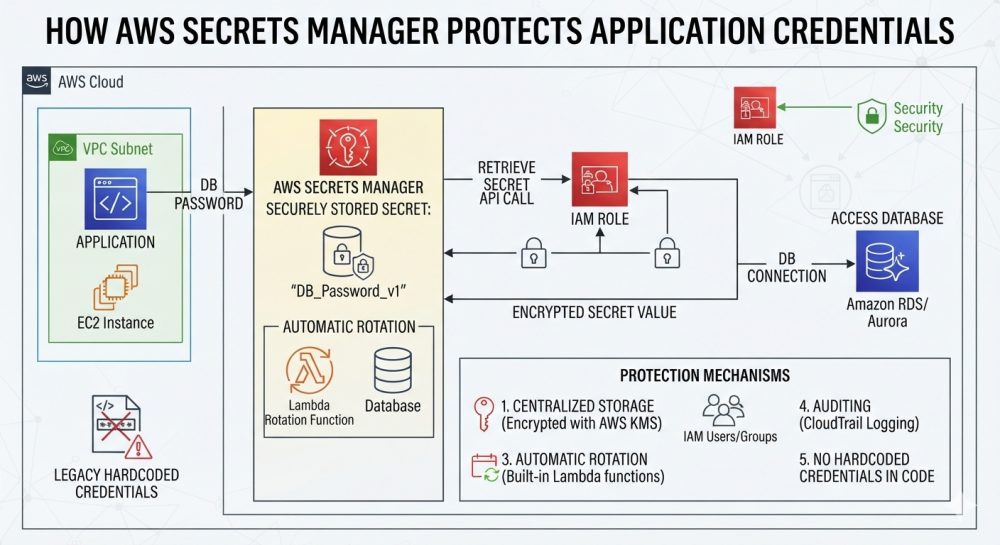
Each app requires some secrets to function. They include database passwords, API keys, and tokens required by third-party apps. Most of the time, learners encounter such values written in the source code directly, as the tutorials usually recommend doing it like that. After that, the code goes to the public repository or logs are stored together with the connection string.
Thus, the secret becomes available without anyone paying any attention to it. That is why it is important to have a great AWS Course Online where learners get to know about secrets management at an early stage of the course. The fact is that AWS Secrets Manager helps keep secrets separate from the application. That is why teams are able to manage access permissions as well as protect each password.
What Happens If Credentials Are Stored by Applications without Secrets Manager?
It is common for the students taking AWS Course in Pune to develop applications like this. Hence, identifying such behaviours is not difficult.
- Password Could Appear in Other Places Apart From the Application: Removal of the password from the latest file does not solve the problem. The old files, duplicated files, and deployment package might have the password as well.
- Sensitivity of Configuration Files Shared By Many People: The plain text file format has this same problem. Even people and software who do not need the password can see it, since the access is too broad.
- Risks of Changing Credentials Manually: Manual modifications can have a risk as well, particularly when the team is large. Changing the password on the database will require changing all the other applications, and just one missing configuration will break the connection.
How AWS Secrets Manager Protects Application Credentials
This is the very essence of the service, and in an AWS Certified Solutions Architect Course, you have to do this properly. Let’s start by following the life cycle of the secret through creation to rotation.
Step 1: Storing Credentials Outside Application Source Code
First, let’s create the secret containing either the database credentials or an API key. Then the application has a reference to this secret but never contains the actual password. This helps reduce the risks because there is no password stored in the application source code. However, it cannot be stored in logs and error messages either.
Step 2: Encrypting the Secrets While at Rest
Secrets Manager encrypts all secrets using AWS Key Management Service (AWS KMS). The encryption is done by a KMS key that encrypts the secret value. Hence rules associated with the KMS key become part of your defence line. However, encryption cannot be used as a substitute for access control since an individual who is permitted to access the key can read the secret.
Step 3: Authentication of Application and Secret Access Control
Any application that will run on AWS can use an IAM role; hence there will be no access keys stored in the application. There are IAM policies that control which secrets can be read by which role, while sometimes additional control can be achieved through resource policies. For instance, a payment processing application can access a secret of the payment database only.
Step 4: Retrieve the Secret via the AWS API or SDK
While running, the application queries the service for the secret via API or SDK. Permissions will be verified by the service before providing the value. Even after being granted access, the considerations of safe transit and secure handling apply here too. Moreover, refrain from making extra calls and excessive logs in order to keep your secrets safe.
Step 5: Update Credentials to Reduce Risks Over Time
In Secrets Manager, you can change supported credentials automatically based on a schedule that involves AWS Lambda functions. First of all, a new password will be generated and second of all, the credential will be updated in the target system. The application accesses the secret every time it is necessary. However, the update process requires certain preparation and support from the application side. Besides, not all API keys can be updated separately.
The Way Audit Logs and Monitoring Enable Detecting Credentials’ Misuse
It is important not just to protect yourself but also to know who used a particular secret.
- AWS CloudTrail logs all interactions using the API, including interactions with secrets.
- Amazon CloudWatch will offer you the right logging, metrics, and alarms if you configure it correctly.
- Periodic review of IAM roles will allow you to find out who can access and modify each secret.
- In case of any activity, audit logs will let you know which identity used the secret and when.
But that depends on your log configuration. The way monitoring will help you discover any suspicious activity but not prevent any attempts.
What Teams Must Configure to Keep Secrets Secure
Tools are useful only if properly configured. Even students from an AWS Certified AI Practitioner Course should know this rule since AI applications are not exempt from using external services.
- Implementing IAM Policies based on the Principle of Least Privilege: Provide secret ARNs and actions required for each application role. However, too wide permissions are not good, because they create some extra risks.
- KMS Key and Secret Policy Permissions Protection: Make sure that no one can access the key and change the permissions of the secret policy. If not, then relaxed permissions will ruin the benefits of encryption.
- Configure Rotation and Handle Failures: Enable rotation where available, and test the whole workflow. Some applications that store old passwords indefinitely in memory will break down post-rotation.
- Prevent Secret Exposure After Retrieval: Prevent leaks of secrets through logs, stack traces, source code repository, and temporary storage files. Try to minimise the time they spend in memory wherever possible.
- Test Recovery and Operational Access: Ensure that authorised services can access the secret both in the course of deployments and recoveries. Lastly, perform tests of permission changes before deploying them into production.
Conclusion
There are a lot of options available for the use of the Secrets Manager in order to secure the secrets of the application. The list includes the storage of the secret outside of the application, its protection by means of the KMS key and limitation of access to the secret by means of IAM. The rotation will play a role of limitation of the lifespan of the secret, while audit logs will show what has been requested. However, all of these features demand careful planning and implementation since they depend on the whole secret lifecycle and not only on the storage of the password in some particular service.