Data safety as well as its preservation are the top priorities of every business organization. After an employee leaves the organization, the IT administrator takes the backup of that former employee’s data. What if the IT admin is unable to access a departed employee’s Outlook mailbox? It can be a major challenge. The scenario is created with the removal of the Exchange account. In some cases, credential issues can cause this scenario, while in other cases it is caused by the deletion of the Outlook profile.
The security layer of OST data files is the main hurdle. Old OST files often remain tied to their original accounts, making direct access impossible. The solution is converting an old OST file to PST. This is where professional Online OST Converter tool comes in. Online platforms allow the user to extract and restore mailbox data seamlessly.
An online OST converter works directly with orphaned OST files. This tool can handle oversized or compact OST file formats. It also ensures data integrity throughout the process. To know more, check out our guide titled “Cannot Access Old Employee Mailbox? Convert OST to PST Online.”
Why Old Employee Mailboxes Become Inaccessible?
- This scenario may be caused by the removal of old employee’s Outlook account
- There is a possibility that leaving employee’s Exchange Profile is deleted (by mistake or intentionally)
- Unavailable of password or access credentials
- System reinstallation or migration can also lead to this scenario
Ways to Convert Outlook Data File (OST) to PST:
In this part of our guide titled “Cannot Access Old Employee Mailbox? Convert OST to PST Online,” we will discuss ways to convert an OST to PST format. Follow the below guide:
Built-in Functionalities: Before leaping forward to uncover such functionalities, we must understand that these built-in utilities work in certain conditions. These manual conversion methods work when:
- The OST file is still linked to its original Outlook profile.
- The associated mailbox is active and accessible.
- Outlook can open and read the OST file without corruption.
- The user has valid permissions to access the mailbox data.
- The Import/Export wizard in Outlook is available and functional.
1. Manual Way – Using Import/Export Wizard:
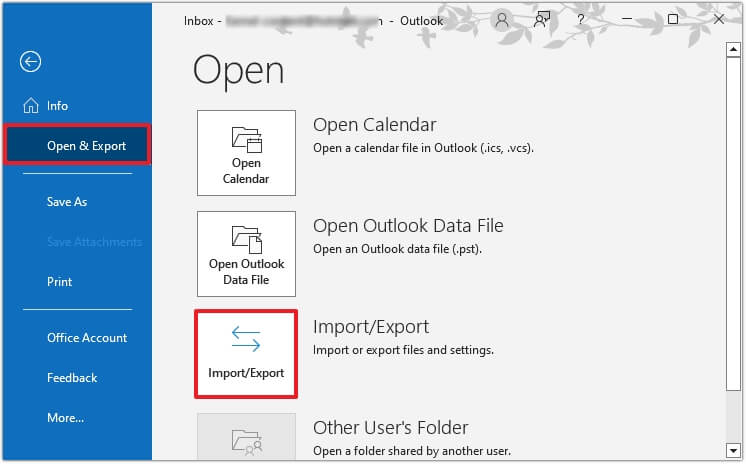
We have already discussed preconditions of manual methods. If the above-conditions are fulfilled then follow the below steps:
- Navigate to Files
- Browse Open & Export
- Go to Import & Export
- A pop-up window will open and ask for selecting the action
- Select “Export to a file” option
- It is the time to choose file format. Choose Outlook Data File (.pst) option
- After this select “Next”
- A dialogue box asking foe folders that need to be exported. Choose such folders. Select subfolders as well. Press Next.
- Browse the location where you need to save the new PST files. Also choose “Replace …. Exported” option. Hit on “Finish”
Limitations of Manual Methods:
- Manual functionalities won’t work when the OST file is orphaned
- Built-in utilities fail when the data file (.ost) is no longer tied to its original profile
- Manual ways fail when the mailbox/ Exchange account has been deleted or is inaccessible
- It will not work when the OST file is severely corrupted and cannot be opened in Outlook
- Manual functionalities will fail in case Outlook is not installed or cannot recognize the OST file
2. Recommended Method – Convert OST to PST Online:
An online OST conversion simplifies mailbox recovery. It instantly transforms an inaccessible OST into a portable PST format. This method doesn’t need an active Exchange Server. It is also not dependent on Outlook. An Online OST converter tool handles a large or compact OST file efficiently. Platforms like Stellar’s online OST to PST converter offers free conversion of a single file (less than 500MB). Such free conversion is available for 24 hours to download.
How Online OST Converter Works?
Benefits of Online OST Converter:
- Strict compliance of “No User’s Data Retention Policy,” the data is deleted after conversion.
- Online OST conversion unlocks orphaned files (.ost) without needing the original Outlook profile.
- It ensures mailbox recovery even when Exchange accounts are deleted or inaccessible.
- Automated tools preserve folder hierarchy and data integrity during conversion.
- Online OST converter handles large or compact OST files efficiently.
- They outperform manual methods by eliminating dependency on Outlook or active mailboxes.
- The process includes uploading OST files, selecting output PST format, and mapping mailboxes.
- Final migration steps involve importing the converted PST into Office 365 or Outlook seamlessly.
Conclusion:
In the above guide, we have discussed ways to recover inaccessible mailboxes. The only way is to convert an inaccessible OST to the portable PST format. But it is a challenging task. We have explored one built-in functionality (Import/ Export Wizard) to perform this task. However, it has its limitations. It will work when the file is accessible. However, it will not work in the absence of the Exchange server. The method will fail in case of an orphaned OST. At this juncture, an online OST converter can work efficiently. This web-based platform works independently. It can recover mailbox files securely without requiring Exchange connectivity. This online converter also aids in proper mailbox data management.