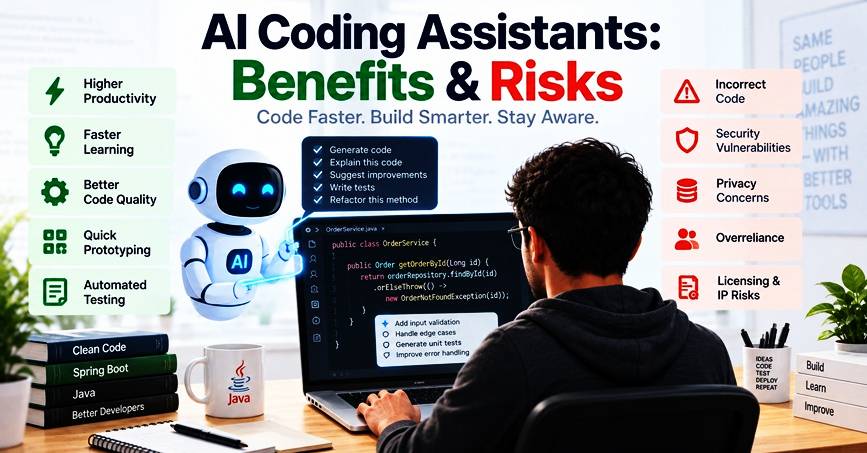
It’s no longer necessary for software developers to code every line individually. AI coding assistants can write code, explain unknown classes, write tests, provide suggestions for fixing code, refactor methods, and even give developers technical solutions to explore.
This can speed development up. However, higher speed of code generation does not guarantee the better software.
The code produced by AI may be flawed, vulnerable, contain faulty logic, or have too many external references. Also developers can become too attached to suggestions which they don’t fully understand.
The key is not to use AI coding assistants to replace developers. Rather, developers need to leverage them for productivity and retain the judgment, testing, code review and architecture decisions of the humans in the development process.
What is the advantage and disadvantage of AI coding assistants?
AI coding assistant: These are tools that rely on AI (typically a large language model) to support the programming process.
Main benefits
- Faster code generation
- Faster prototyping
- Easier debugging
- Test generation
- Code explanation
- Refactoring assistance
- Help with documentation
- Less repetitive coding time.
- Less repetitive coding time.
Main risks
- Bad or incomplete code
- Security vulnerabilities
- Data privacy and the handling of sensitive data.
- Privacy and handling of sensitive data concerns.
- Relying heavily on AI-generated suggestions.
- Inadequate knowledge about the generated code
- Inconsistent coding standards
- Wrong dependencies / APIs
- Potential intellectual-property concerns
The latest studies indicate that AI assistants have the potential to significantly reshape software engineering tasks. In a 2026 longitudinal study, many developers said that they spent less time coding and more time verifying and correcting. A 2026 study reported a slight decrease in developer competence in answering technical questions associated with the code they generated when using AI assistance, despite recording an increase in task completion.
The key takeaway here is that while AI can help speed up software development, developers must still take responsibility for the engineering choices they make.
What Are AI Coding Assistants?
An AI coding assistant is a software application that uses AI models to assist programmers.
It can be used in an IDE, terminal, source-control platform or web application, depending on the tool.
Common tasks include:
- Completing partially written code
- Creating methods and classes
- Explaining existing code
- Creating unit tests
- Suggesting refactoring
- Finding possible bugs
- Generating documentation
- Translating code from one language to another.
- Helping investigate errors
- Creating SQL queries
- Explaining framework APIs
An AI assistant can help a Java developer by responding to their queries, such as:
Develop a Spring Boot REST API to fetch an order given its ID.
The assistant can create a controller, service call, DTO and exception handling example.
The developer can then check the outcome, adjust it to a project’s architecture, create tests and commit the final implementation.
That distinction matters.
The AI provides a suggestion. The developer is still liable for the software.
Why AI Coding Assistants Matter
The traditional software development process doesn’t just include typing code.
Developers read documentation, search for examples, debug errors, write tests, review pull requests, understand existing code and do repetitive work.
Some of that friction can be alleviated with AI coding assistants.
For instance a developer can have an assistant create a first mapping method for Java, rather than manually writing the code.
The developer can ask the assistant to explain the control flow instead of needing to learn a new approach which might require minutes of time.
The developer does not need to create a test class from a blank file, but can instead ask an initial test structure.
AI can be particularly helpful in augmentation, where the developer keeps control but passes the baton to a tool for some specific tasks.
See the related resource: AI-Assisted Software Development for Developers for a wider overview of AI-assisted software development.
Unlocking the benefits of AI Coding Assistants.
1. Faster Code Generation
For repetitive implementation tasks, AI assistants are very helpful.
Developers can create a first draft of:
- DTOs
- Java classes
- Getters and setters
- REST controllers
- Repository methods
- Unit-test structures
- Configuration examples
The developer can then check and edit the code generated.
This can save some amount of time when launching from an empty file.
2. Faster Prototyping
AI simplifies the process of creating a working prototype from an idea.
A developer might want to provide a brief description of a small Spring Boot API and request that it be built:
- Project structure
- Entity model
- REST endpoints
- Service layer
- Repository layer
- Sample tests
The outcome may not be ready for production, but it might be a good starting point.
This is particularly useful when performing experiments.
3. Better Developer Learning
AI coding assistants can serve as a talking point that explains coding.
A beginner can ask:
Describe the need of this Spring boot dependency.
Or:
Describe this Java Stream operation in detail.
Or:
Why are the results in this SQL query duplicated?
The developer can ask further questions without having to browse several non-related pages.
But verification of learning is still needed. AI explanations might also be incomplete or wrong.
4. Faster Test Generation
Developers are aware of the importance of testing but often take a considerable amount of their time writing repetitive test cases.
Use an AI assistant to create a draft test structure.
For example:
@Test
void shouldCalculateOrderTotal() {
OrderItem item = new OrderItem(
new BigDecimal(“100.00”),
2
);
BigDecimal result = calculator.calculateTotal(List.of(item));
assertEquals(new BigDecimal(“200.00”), result);
}
The developer should then add Boundary Cases and ensure that the assertions are indeed the business requirements.
5. Easier Code Explanation
AI assistants can read code bases to the developer’s comprehension.
This is helpful if:
- Participation in an ongoing project
- Revising old Java code
- Investigating production issues
- The ability to comprehend a complicated method.
- Casting a vote for an unknown system
Instead of requesting the assistant to rewrite everything, developers can ask the assistant to explain in detail the current implementation first.
This can be used to gain understanding without necessarily implementing changes on the spot.
6. Refactoring Assistance
AI can help identify areas for rework to make the code easier to read or less repetitive.
For example:
if (user != null) {
if (user.getAddress() != null) {
return user.getAddress().getCity();
}
}
return null;
It may be suggested that implementing it as Optional would be simpler by an assistant.
The suggestion may be helpful, but the developers should weigh the suggestion against coding standards of their project.
Not all shorter code is better code.
The dangers of AI Coding Assistants
Don’t expect AI-generated code to be correct.
Do not assume that AI-generated code is correct.
The biggest danger is that generated code may appear to be correct but be incorrect.
An AI assistant may:
- Use an outdated API
- Invent a method
- Misunderstand business rules
- Produce incomplete error handling
- Write code that compiles, but doesn’t work as intended.
GitHub’s responsible-use guidelines state that AI-generated code may be incorrect and should be reviewed and tested, especially for critical or security-related applications.
This is not sufficient, however, when it comes to compilation.
A program may compile, and still be logically wrong.
2. Security Vulnerabilities
The code created by AI may have vulnerabilities.
Examples include:
- SQL injection
- Hard-coded credentials
- Weak authentication logic
- Missing authorization checks
- Unsafe deserialization
- Improper input validation
- Insecure dependency choices
An AI assistant can, for instance, create a SQL query that directly combines user input:
String sql = “SELECT users.* FROM users WHERE users.name = ‘” + username + “’”;
This is dangerous.
A better way is to employ parameterized queries:
String sql = “SELECT * FROM users WHERE name = ?”;
AI can be useful to developers in discovering security issues, but security review isn’t solely about AI. It’s worth noting that GitHub states that AI tools should not be used for a complete security analysis and advises code scanning and secure coding practices.
3. Overreliance on AI
A developer can slowly begin to make the habit of solving problems without thinking.
The following workflow can be created:
Problem
↓
Ask AI
↓
Copy code
↓
Run tests
↓
Commit
That is risky.
A better work flow is:
Understand problem
↓
Design solution
↓
Get help from AI
↓
Review generated code
↓
Test and validate
↓
Refine
↓
Commit
Overreliance is explicitly warned of by GitHub due to incorrect or incomplete AI output being hard to identify.
4. Code Understanding Loss
Long-term is an important issue that needs to be addressed.
Developers may lose faith in their own explanation when they continue to take code from a generator without comprehending it.
An 2026 IEEE study found that task completion rate was higher in the AI-assisted group, though they showed a drop in proficiency with responding to technical questions with the code they had generated.
From the developer perspective, this is important at the following stages:
- Code reviews
- Debugging
- Production incidents
- Technical interviews
- Architecture discussions
- Maintenance work
If you can’t explain important code in your application, then you do not fully own that code.
5. Privacy and Sensitive Information
Developers need to take into account the data that the AI coding tool is receiving and how it is being processed.
Never casually paste:
- Production credentials
- API keys
- Customer information
- Private certificates
- Confidential business logic
- Internal security details
Clear policies should be defined on what kind of repositories and data can be used with AI coding tools.
Data-use policies and privacy settings should also evolve over time, and the documentation of the tool(s) that the team has chosen should be reviewed.
Developers should look at the specific plan and organization policy and not assume that everyone has the same usage experience because, for example, the current GitHub documentation uses the distinction between individual and business/enterprise Copilot users to show different data-handling policies.
Avoiding dependency and supply chain risks.
Preventing dependency and supply chain risks.
The generated code might include libraries or dependency versions that seem to be correct, but need to be thoroughly tested.
A developer ought to check:
- Does the dependency really exist?
- Is it maintained?
- Is the version supported?
- Is there any known vulnerabilities in it?
- Is it necessary for the project?
However, as noted in GitHub’s security documentation, AI-assisted fixes may occasionally propose dependency changes that need confirmation.
7. Intellectual-Property Concerns
Sometimes, AI-generated code looks like publicly available code.
This poses some intellectual-property and licensing issues for organisations.
When using code scanning or duplication-detection tools, developers must obey their company’s policies, and when not applicable, they should use those tools if they are available.
The legal context surrounding the use of AI-generated code depends on the tool, the jurisdiction, license and situation and organisations should not presume that AI-generated code is free of any licensing concerns.
How Developers Should Use AI Coding Assistants
It is safest to use AI as a tool to assist developers rather than a fully autonomous decision maker.
Step 1: Understand the Problem First
Before using AI to create code, be aware of what is being solved.
Write down:
- Expected input
- Expected output
- Business rules
- Error conditions
- Security requirements
- Performance requirements
Step 2: Give Focused Instructions
Instead of:
Create my whole application.
Try:
Write a Spring Boot service method to validate an order,
checks inventory, and returns a validation result.
The controller and repository layer may not be changed.
Narrow prompts typically facilitate review.
Step 3: Review the Generated Code
You need to read through all of the important suggestions in Step 3.
Ask:
- Is this correct?
- Is it similar to our buildings?
- Is it secure?
- Is it readable?
- Does it introduce a dependency?
- Is it able to manage corner cases?
Step 4: Run the generated code.
Apply normal engineering techniques:
- Unit tests
- Integration tests
- Static analysis
- Security scanning
- Code review
- Build validation
- Testing of performance as appropriate.
AI should be a new part of the development process, not a decision maker.
Step 5: Human in the Loop
This is a special emphasis for high impact systems.
AI coding agents are becoming more adept at making wider changes, and some can even be used on a repository and development environment. These features add to the need for permission control, validation, security scanning and human review controls.
In this real-world use case, we will build a Spring Boot API.
In this real-world use case, we’ll create a Spring Boot API.
Suppose that a developer is developing an order-management API.
The developer can use an AI coding assistant to:
- Create a preliminary DTO.
- Create a controller skeleton.
- Create a test for the service-layer.
- Describe a Spring annotation that you are not familiar with.
- Suggest validation rules.
- Create test data for invalid data.
- Analyze code for any glaring problems.
However, it is ultimately up to the developer’s discretion:
- What the API contract should be
- What are the policies for the business?
- How authorization works
- How transactions are handled
- What is the right way to design the database to handle the data?
- Error responses received by clients.
- Which performance guarantees are needed
The AI can help to speed up implementation.
The developer is the owner of the design.
Common Confusion Points
Will AI take the place of software developers?
Not automatically.
Whilst there are some tasks in software development that are being transformed by AI, there are many tasks which still need problem solving, system design, business knowledge, security judgment, debugging, communication, and accountability.
Can AI code be used for production?
Not by default.
Always use the generated code as a draft until it has undergone the same level of quality, testing, security, and review as manually created code.
Should AI coding assistants be used by beginners?
Yes, but carefully.
AI can assist beginners to explain concepts, create small examples, and investigate alternatives. They should not copy many lines of code without an understanding of what they do.
But, is it always better for developers to be more productive when working with AI?
No.
Productivity is tied to the problem, developer experience, quality of the tools, review overhead, and complexity of the problem.
Existing studies indicate that AI has the potential to enhance certain aspects of development productivity and redefine the role of developers by shifting their focus to verification and monitoring tasks.
Conclusion
AI coding assistants are increasingly playing a vital role in contemporary software development.
They can decrease repetitive labor, accelerate prototyping, clarify the meaning of unknown code, compile tests and accelerate the exploration of solutions by developers.
There are however some serious dangers involved. There is potential for generated code to be wrong or unsafe. Suggestions can turn into a dependency for developers. AI-generated changes may not always be well tested, leading to some issues with code quality, or privacy concerns with sensitive information.
There is no single correct solution to these two extremes: “AI will replace developers” or “developers should ignore AI.
The practical approach is:
- Use AI for speed.
- Apply engineering judgment to determine the correctness.
Developers that can analyze, validate, protect and enhance AI-generated code will have a better chance than developers who just copy and paste what the AI generates.
What to Learn Next
Once you have grasped what an AI coding assistant is, learn how to use it:
- AI-driven software development processes
- Prompt engineering for developers.
- Secure coding practices
- Testing with Java and Spring Boot
- Best practices for code review.
- The programs engineered for software development.
- Software development AI agents.
- Designing the system and its architecture.
- Designing the system and system architecture.
Next, as a Java developer, you’ll need to understand how AI can be integrated into the entire development lifecycle – not just code completion.