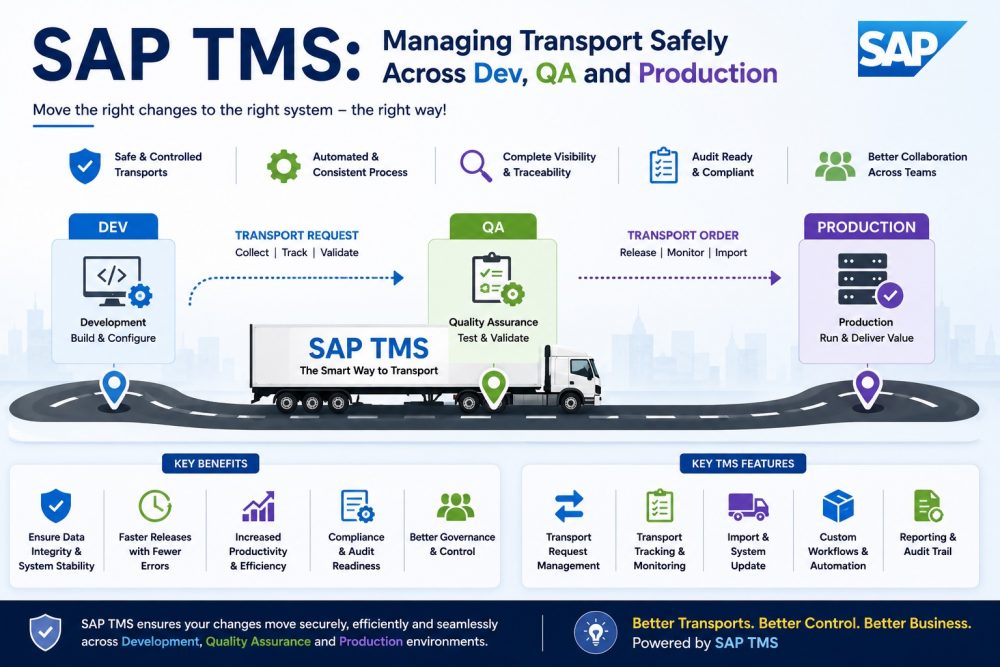
Changing business-critical and large enterprise software. Must be made very carefully. Any change that is made to a live system without testing can bring all activity to a halt immediately. Therefore, to have clear directions for how setup changes can be moved across the various servers involved. You can learn the steps to take to set up changes around different system installations with the SAP Course Online. Consider. For example, a developer is creating a new tax rule in a private environment. This change has to undergo strict manual and automatic testing checks before going near actual money movements.
SAP Transport Management System (TMS) is the tool that controls these fixes. This system combines the changes in small transports so they can be moved smoothly one at a time. The example track history shows one payroll change moving through each setup phase until it is released. Systems administrators follow every step to keep the production environment exactly stable.
Understanding SAP TMS and Transport Landscape Architecture
A large systems setup uses a clean three-part layout for maintaining correct data. The normal setup involves three different server locations.
- Development (Dev): The first workspace where builders modify parameters and add new programs.
- Quality Assurance (QA): The test area in which the team analysts check settings against the business rules.
- Production (Prod): The workspace of the company’s actual day-to-day activities.
This isolation prevents an unverified code from bleeding into production business data. The layout separates experiments from the normal day-to-day work.
How Transport Requests Move Across Systems?
Changes made inside the development space create unique tracking numbers called transport requests. A transport request acts like a box that holds specific object updates and setup data. The path follows a strict order:
| Phase | System Location | Action Performed |
| Creation | Development | The system saves setup changes into a new request box. |
| Release | Development | The builder closes the box, starting an automatic file export. |
| Testing | Quality Assurance | The admin brings the box files in for user validation. |
| Deployment | Production | The approved box gets its final import into the live database. |
When a request is released, it causes real files in a shared folder to be created at the operating system level. These files contain the actual data for the item and the custom active code.
Configuring STMS and Transport Routes in SAP Environments
All transport routes are configured by the system administrators with the quick transaction code . This is a centralised program that defines file transfers between the servers in the network.
First, one system becomes the main domain controller to manage the overall setup. Next, admins build transport routes using two distinct path types:
- Consolidation Routes: Routes originating from the development server and leading to the test server.
- Delivery Routes: Paths from the test server to the live production server.
Learners enrolled for the SAP Course in Bangalore can set up these route links appropriately. Well-defined path setting ensures transport requests do not miss important tests.
Managing Import Queues and Preventing Transport Conflicts
Each target server has a clear import queue of all requests to be imported. Investigate these lists frequently to prevent twin change conflicts in update cycles.
Admins use special STMS choice buttons to stay in full control:
- Import All Requests: Will import the entire list of changes in exact chronological order.
- Import Single Request: Transfers a single selected box for an urgent, rapid resolution.
Good queue control stops overtaking, where a newer request changes an item before an older one lands.
Common Risks During SAP Transport Migration Processes
Moving system settings brings a few technical risks that need quick, smart fixes.
- Missing Pieces: The request the worker is making calls for is not yet available or open. It is still in an unreleased box.
- Overtaking Boxes: An older setup would cancel out a newer one due to the wrong priority of import.
- Wrong Target Clients: Changes are delivered in an incorrect logical section of the target server.
Taking a formal SAP Course in Ahmedabad can give learners real practice to identify these system conflicts in advance. Awareness of these risks allows teams to schedule much safer upgrade windows.
Transport Dependency Checks and Sequence Management
Handling transport links requires following a strict time order based on when items were made. When two developers edit the same database table, the system tracks multiple linked requests.
Loading transport 002 before transport 001 creates a major system crash error. Admins use cross-system locking tools to stop people from editing the same vital objects at the same time.
Using ChaRM and Approval Workflows for Safer Releases
Change Request Management, a tool inside SAP Solution Manager, automates the safety check path. forces a tight approval chain that matches tech fixes with official business sign-offs.
This tracking tool ties transport requests directly to real business change forms. If an imported change causes a bad error, admins start a rollback process. This step loads a past stable box to fix system work right away.
Conclusion:
SAP Release Management requires strong technical habits to keep live business systems running well. Using tools like STMS and ChaRM ensures that changes flow smoothly through dev, test, and live spaces. Mastering these transport steps shields live business tasks from sudden software bugs.