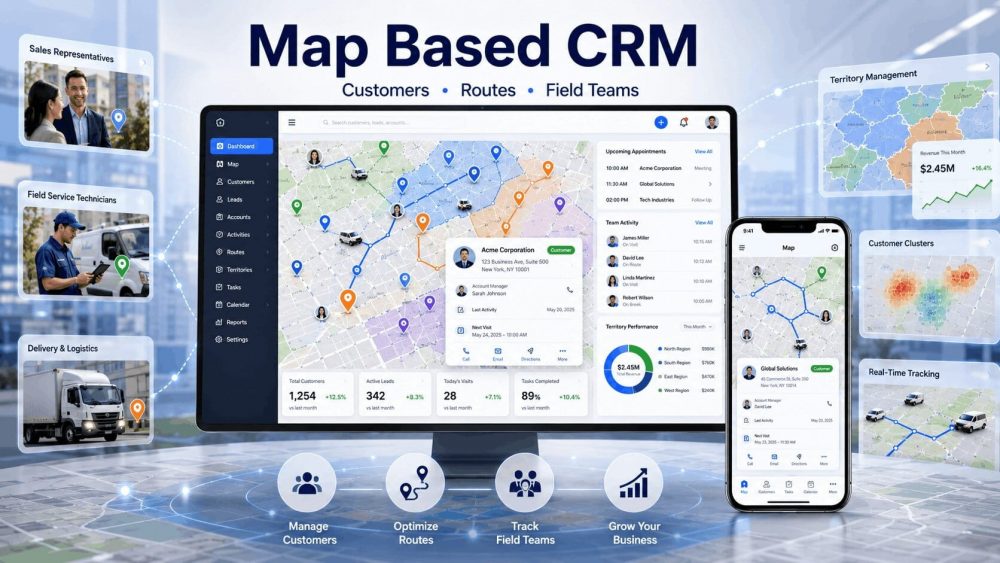
Customer data is no longer limited to names, phone numbers, and notes. Businesses now manage deliveries, field teams, customer visits, and service requests across different locations. That is where a map based CRM becomes useful.
A CRM with maps combines customer information with visual location data. Instead of scrolling through long records, teams can see customer activity directly on maps. Pretty handy, right? Businesses can view customer locations, assign nearby staff, improve route optimization, and organize daily work from one system.
Unlike a regular CRM, map based CRM software helps businesses understand where operations happen, not just what happens. For industries with moving teams, this creates faster decisions and better planning.
Why Businesses Need Better Customer Mapping?
Businesses move fast today. Teams travel, routes change, and customers expect quicker service. Traditional systems often struggle once operations grow.
1. Challenges With Standard Crm Systems
A regular CRM stores customer records well, but location visibility is often missing. Teams may switch between spreadsheets, GPS apps, and customer records just to complete daily tasks.
Common issues include:
- Missed appointments
- Poor customer location management
- Route confusion
- Delayed communication
- Weak business location tracking
This becomes a challenge for businesses using field sales CRM systems or managing delivery teams.
2. Why Location Visibility Matters?
Location data gives teams a clearer view of operations. Managers can use real time GPS tracking, live location updates, and customer location analytics to understand what is happening across the field.
With stronger visibility:
- Teams reduce travel time
- Nearby tasks get assigned faster
- Service response improves
- Territory management becomes easier
3. Rising Demand For Map-Based Operations
Businesses now rely heavily on field activity. Logistics service businesses, agriculture teams, and delivery companies all depend on location-based workflows.
That demand has increased interest in location intelligence CRM, customer mapping software, and business mapping CRM tools.
Companies want customer records, but they also want visual insights. That is why map-based operations continue growing.
Understanding the Basics of Map Based CRM
Many businesses ask what is a map based CRM and why it is becoming popular. A map based CRM software combines customer information with location data and displays it visually on maps. Instead of seeing long lists and records, teams can view customers, tasks, and activities based on location. Pretty simple idea, yet it changes daily work in a big way.
The main goal of a CRM with maps is to make customer information easier to understand and easier to act on. Businesses can manage customer location management, organize visits, improve route optimization, and support stronger territory management from one place.
How Map Visualization Changes Workflows
Traditional systems usually show customer information in tables. Teams then move between maps, spreadsheets, and tracking tools to complete work. You know how it goes. It takes extra time and creates confusion.
A map view CRM changes this process by displaying activities visually. Managers and teams can quickly:
- View customer locations
- Identify nearby tasks
- Plan faster routes
- Organize service territories
- Monitor field activities
This improves field workforce management and helps businesses react faster.
Customer Data Displayed On Maps
A customer mapping software platform can display several types of information directly on maps. Rather than searching through records one by one, teams can view everything in a single screen.
Map data often includes:
- Customer addresses
- Active tasks
- Service requests
- Delivery scheduling
- Team locations
- Customer location analytics
With stronger customer data visualization, businesses gain a clearer picture of operations. Small details become easier to spot, and teams spend less time hunting for information.
How Map Based CRM Systems Work Step by Step?
Many businesses ask how does a map based CRM work after hearing about location-based customer management. The process is actually simple. A map based CRM takes customer information, connects it with location data, and displays everything visually. Instead of jumping between tools, teams can manage activities from one screen. Pretty smooth, right?
1. Customer Information Gets Added Into Maps
The process starts when customer details are added to the CRM. Information such as addresses, contact details, visit history, and service requests gets stored in the system.
The CRM then converts customer addresses into geolocation data and places them on interactive maps. This creates stronger customer location management and helps businesses organize work based on where customers are located.
Data commonly added includes:
- Customer addresses
- Contact information
- Order history
- Service requests
- Notes and activities
This creates the foundation for customer relationship management with maps.
2. Live Business Data Appears on Map Views
A map view CRM displays activities as they happen. Managers no longer need to refresh spreadsheets or switch between systems. Customer visits, deliveries, and assigned work can appear directly on maps.
Teams can quickly see:
- Active service tasks
- Delivery scheduling updates
- Customer locations
- Staff movement
- Open assignments
This type of customer data visualization gives businesses a clearer view of daily operations.
3. Teams Receive Real Time Location Insights
Field teams often move throughout the day. Without visibility, things can become confusing pretty fast. A location tracking CRM solves this by showing live location updates and real time GPS tracking.
Staff can identify:
- Nearby customers
- Assigned tasks
- Faster travel paths
- Updated routes
This supports stronger route optimization and improves field workforce management across teams.
4. Managers Track Tasks Through Map Dashboards
Managers need a full picture of operations. That is where map dashboards become useful. A business mapping CRM dashboard combines customer activity, tasks, and team movement into one place.
Managers can monitor:
- Team activity
- Customer visits
- Sales territory mapping
- Task progress
- Territory management performance
Instead of searching through reports, managers can understand operations at a glance. Simple change. Big impact.
6 Essential Features Found in Map Based CRM
Not every map based CRM software works the same way. Some focus on sales teams while others support logistics, service businesses, or delivery operations. Still, a few core features appear in almost every system. These tools help businesses improve visibility, reduce manual work, and organize daily operations. Pretty useful stuff.
1. Interactive Customer Location Mapping Tools
A strong customer mapping software should display customer information directly on maps. Instead of searching through records, teams can instantly understand where customers are located and where activities are happening.
Interactive mapping often helps businesses:
- Group customer locations
- Search nearby customers
- Filter service areas
- Review customer history
- Improve customer location management
This type of customer data visualization helps teams understand information much faster.
2. Smart Route Planning and Schedule Features
Travel time creates delays and extra expenses. That is why many businesses rely on route planning CRM features to organize daily movement.
Smart route tools help teams:
- Build faster travel paths
- Reduce fuel use
- Improve delivery scheduling
- Prevent overlapping visits
- Support route optimization
Small route improvements can save hours over time. Bit by bit, efficiency improves.
3. Real Time GPS Tracking for Field Teams
Field teams are constantly moving. Managers need visibility without making endless phone calls. A location tracking CRM solves this using real time GPS tracking and live location updates.
This allows businesses to monitor:
- Staff movement
- Arrival times
- Active routes
- Current task status
For companies managing field teams, this becomes a big help.
4. Territory Management for Sales Operations
As businesses grow, territories often become harder to manage. Without structure, sales teams may visit the same areas or miss opportunities completely.
Good territory management tools support:
- Sales territory mapping
- Region assignment
- Customer grouping
- Area planning
This creates clearer workflows and stronger coverage.
5. Map Based Task Assignment and Tracking
A business mapping CRM allows managers to assign work based on customer location. Nearby employees can receive tasks without unnecessary travel.
Teams can quickly:
- Assign field jobs
- Track progress
- Update activities
- View customer visits
Simple process. Less confusion.
6. Business Reports Using Location Analytics
Reports help businesses understand patterns and performance. Strong location intelligence tools provide insights through customer location analytics and operational data.
Managers can review:
- Route performance
- Team productivity
- Customer activity trends
- Service area performance
This gives businesses better information for future decisions.
Top 5 Key Benefits of Using a Map Based CRM
The benefits of using a map based CRM go beyond simple customer tracking. Businesses get a clearer picture of operations, team activity, and customer locations. Instead of relying on guesswork, decisions can be based on visual data. Sounds simple, right? Yet for field teams and service businesses, it can make a huge difference.
1. Faster Decisions Through Location Visibility
Managers often need quick answers during daily operations. A map based CRM provides location visibility through maps and live updates, making information easier to understand.
Teams can quickly:
- View customer locations
- Find nearby employees
- Check active tasks
- Monitor service areas
With stronger visibility and customer data visualization, businesses spend less time searching for information and more time taking action.
2. Lower Travel Time and Fuel Expenses
Travel costs add up fast. Small delays and poor routes can create unnecessary expenses over time. A route planning CRM helps businesses organize smarter travel paths and improve route optimization.
This can help reduce:
- Extra driving distance
- Fuel costs
- Route overlap
- Delayed customer visits
Bit by bit, better planning creates noticeable savings.
3. Better Customer Service and Team Response
Customers expect fast service. Nobody likes waiting around. A location tracking CRM with real time GPS tracking and live location updates helps businesses assign nearby team members quickly.
This often leads to:
- Faster response times
- Better appointment handling
- Improved service delivery
- Stronger customer satisfaction
Small improvements in response time can create a better customer experience.
4. Increased Productivity Across Field Teams
Field workers lose time when routes are unclear or tasks change unexpectedly. Strong field workforce management tools help teams stay organized throughout the day.
Teams can:
- Access assigned work faster
- Reduce travel delays
- Update task progress
- View customer information instantly
Less confusion usually means more completed work.
5. Improved Sales Territory Performance Rates
Growing businesses often struggle with area overlap. Sales teams may accidentally visit the same regions or miss opportunities completely.
Features like territory management and sales territory mapping help organize regions more effectively. Teams gain better coverage, clearer responsibilities, and stronger planning across assigned territories.
Industries That Benefit From Map Based CRM
Almost any business that works across multiple locations can benefit from a map based CRM. Companies with field staff, deliveries, customer visits, and service areas often deal with route planning challenges every day. You know how it goes. Teams travel constantly, schedules change, and customer requests keep coming in.
A CRM with maps helps businesses organize operations visually. Teams can use location data to improve planning, reduce delays, and manage customer activity more efficiently.
- Logistics and Delivery Service Businesses
- Agriculture and Outdoor Field Operations
- Laundry Pickup and Service Management
- Field Sales and Service Team Operations
- Home Repair and Mobile Service Teams
- And much more…
Tips for Choosing the Right Map Based CRM
Not every map based CRM software offers the same tools. Some platforms focus heavily on sales, while others are built for deliveries, field operations, or service businesses. Picking the right system can feel a bit tricky at first. No worries though. Looking at a few key areas can make the process much easier.
The goal is simple. Choose a platform that matches how your team actually works.
1. Review Available Mapping and GPS Features
The main purpose of a CRM with maps is location visibility. So, mapping tools should be one of the first things to review.
Look for features such as:
- Interactive customer maps
- Real time GPS tracking
- Live location updates
- Route optimization tools
- Customer location management
- Business location tracking
A strong location tracking CRM should make it easy to understand where customers and teams are located without extra effort.
2. Check Team Management and Workflow Tools
A good system should support daily workflows, not create extra work. Teams often handle task assignments, customer visits, service requests, and schedule changes throughout the day.
Review whether the platform supports:
- Task assignment tools
- Field workforce management
- Team activity tracking
- Customer updates
- Territory management
For businesses using field sales CRM systems, these tools can improve coordination and reduce confusion.
3. Analyze Reporting and Analytics Functions
Reports help businesses understand what is working and where problems appear. Without reporting tools, decisions often become guesswork.
Useful reporting features may include:
- Customer location analytics
- Route performance reports
- Delivery scheduling insights
- Team productivity tracking
- Sales territory mapping reports
Strong location intelligence tools turn daily activity into useful business insights.
4. Verify Mobile Support and Accessibility
Most field teams work directly from mobile devices. Drivers, technicians, and sales teams need access while moving between locations.
A location based CRM software for small businesses should provide:
- Mobile app access
- Real-time updates
- Simple navigation
- Fast customer lookup
- Location-based notifications
Pretty straightforward. If teams cannot access information easily, even good software can become difficult to use.
Final Thoughts on Map Based CRM for Growth
Businesses today need more than customer records and contact lists. Teams move across cities, service requests change throughout the day, and customers expect faster responses. A standard CRM may store information well, but it often lacks location visibility. That is where a map based CRM creates real value.
A CRM with maps helps businesses understand where customers are located, where teams are working, and how operations are moving in real time. Instead of switching between different systems, teams can manage activities through a single platform. Pretty useful, right?
Location CRM takes this a step further by combining customer management, task assignments, location tracking, and map-based visibility into one platform built for field operations.
As more companies adopt location intelligence CRM platforms and customer mapping software, location visibility is becoming a bigger part of modern business operations.