I had no plans to test AI music generators. I just needed a background track for a video I was making for a client. I wanted to avoid going down a time-consuming YouTube royalty-free music rabbit hole. I clicked through half a dozen AI music generator sites. They all either asked for a lot of personal information, or had an annoying pop-up ad overlapped on top of the music I was trying to preview. Annoyed, I realized that the more I clicked, the more I was testing the sites. Instead of a digital music maker, it felt like I was on a virtual used car lot. I ran a more formal test and opened AI Music Generator, and then I opened the five music generator sites that I had visited. Instead of a mind-blowing discovery, I learned a lot about friction and site design.
I created a basic brief to help compose a 90-second instrumental track that has a warm, slightly melancholic, folk-pop vibe, with a tempo of 100 BPM, no lyrics, and is appropriate for use in a brand story-telling video. I tested each of the six tools under the same basic brief, and for each, I took note of the page load times, any promotional ads or upsells, and the number of clicks needed to access a downloadable track. I tested each of the six tools under the same basic brief on three separate days to cover for a possible temporary server issue. Some of the tools that I was anxious to try for the first time in their demo videos failed to deliver, as I had predicted. A well known tool that I was anxious to try hit me with an “Enjoy your free 3-day Pro trial” pop-up right as the tool was generating a track. Another tool was littered with add-on banner ads for separating music stems right next to the input box and the “play” button. For users like me, who work on a deadline, these ad placements severed any trust I had in the tool.
The biggest surprise was how quickly I became aware of page clutter. Ironically, after only three days, I started to instinctively work with tools where I didn’t have to skip through multiple pop-ups or work around a “trending” feed just to access my own music generation. One tool that I thought had a beautiful, sleek dark user interface was using a UI that was a public feed of music generation with auto-mixed tests from other users. I prioritize privacy during the creation of unrefined music or work, and this poor design choice led me to self-censor my use of the tool and experiment less.
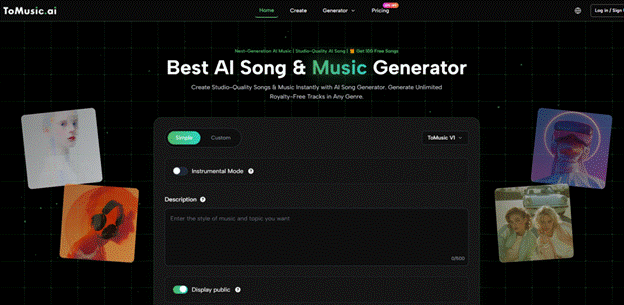
Using the AI Music Maker was a pleasant experience due to the absence of upsell banners on the interface. The dashboard was uncomplicated and consisted of a prompt box and selectors for style and mood. Their design resembled a lightweight brief rather than a complex business application. The style was present throughout the process, even in the progress displayed during the generation of the music. The finished product was conveniently stored in a library, where it could be played or downloaded. There was no push to share or upgrade. After a week of constant prompts to share on other platforms, this was a welcome silence. I wouldn’t call it an extravagant experience, but it was nice to know I wasn’t being distracted and could keep my focus where it needed to be.
Ultimately the quality of the songs generated was the most important feature of the AI Music Maker. This was difficult to quantify. I would not expect AI music generation to produce songs of desirable quality that can be played on air. Some platforms would produce a high quality song on the first attempt, but a small change would result in a disappointing song. Some of these platforms were not good, but were not bad either and would not be hard to promote. I believe ToMusicAI is in this class. The songs it produced were of a high quality, manifesting good musical sense, and were not overly simplistic like some other platforms.
To help other creators, I organized my notes and made a simple comparison table based on my testing sessions. I assigned a score from 1 to 10 related to the sound, loading, ad, update, and UI distractions, and gave my holistic, non-algorithmic score to the platform.
| Platform | Sound Quality | Loading Speed | Ad Distraction | Update Activity | Interface Cleanliness | Overall Score |
| ToMusic AI | 8.5 | 9.0 | 9.5 | 8.0 | 9.0 | 9.0 |
| Suno | 9.0 | 8.0 | 6.0 | 7.0 | 7.0 | 7.5 |
| Udio | 9.0 | 7.0 | 7.0 | 8.0 | 8.0 | 7.8 |
| Soundraw | 8.0 | 8.0 | 9.0 | 6.0 | 9.0 | 8.0 |
| Mubert | 7.0 | 8.0 | 7.0 | 5.0 | 7.0 | 6.8 |
| Beatoven | 7.5 | 7.0 | 8.0 | 6.0 | 8.0 | 7.2 |
The table may suggest that ToMusic AI had a strong showing, but sound quality rankings show that ToMusic AI is not the strongest. For the pop and electronic genres, Suno and Udio occasionally produced sounds of superior quality. As a musician, I understand their appeal. However, that diminished for me every time I had to close a promotional banner or wait at least a 40-second generation queue. The loading time with the distraction of an advertisement created a psychological barrier that made me less likely to want to keep prompting the A.I., which ultimately led to a reduction in the quality of the work I was producing.
What Separates a Tolerable Workflow from a Friction Nightmare
One of the most under-appreciated aspects of any A.I. based tool is its ability to handle repetition. I often need to produce ten to fifteen samples of a theme to capture the right emotional response when scoring a short video. Some of the A.I.s I have used previously would reset the prompt and clear the previous samples with each new generation, forcing me to scribble notes on how I achieved a decent sample. This is the kind of friction that disrupts your focus the most.
The small library feature that made a large difference
ToMusic AI’s unique offering was its built-in music library. Every track I generated was automatically saved to a personal collection. I was able to playback the tracks, rename them, and organize them. The music library was devoid of organization beyond a chronology of generated tracks. This allowed me to effortlessly compare tracks when I was unsure about which take to move forward on. I would use the music library as a listening journal. The music library provided an unconventional release from the anxiety of losing a promising draft, encouraging me to get more creative with the custom option by allowing me to paste a short lyric and direction the vocals.
Other platforms would offer similar features, but would combine personal and public content, or require saving the content yourself. In the middle of a Text to Music creative sprint, having a system that saved by default and stayed out of my way felt less like a feature and more like a base expectation finally met.
How the Generation Process Actually Works, Step by Step
For first-time users of text-to-music tools, the ToMusic AI site describes their interface and the general workflow as follows:
There are two options to chart a generation path. You can either select a simple mode, which is best for ultra-brief, single-sentence prompts, or a custom mode, which lets you input lyrics and designate the style, mood, tempo, and instrumentation.
You may either select the AI model you want or adjust the model with a custom mode. A custom mode allows you to designate the vocal character of the performance, if an example is desired, and whether you want it to be purely an instrumental performance.
You can select from several available AI models, each of which focuses on a distinct style and is more or less suitable for the type of music you want to create.
Once you have made these selections, you can create your performance and listen to the playback from the player. Once satisfied, you may either download the performance and use the track in your music, or store it in your Music Library.
This program gets a very straightforward idea to an audio sample better than almost all of its kind. There are no advanced features, like a multi-track editor or stem separation.
Where the Tool Fits and Where It Doesn’t
I think it’s beneficial for potential users of this product to have an understanding of its limitations. If you’re a producer hoping to remix a song by generating stems in Ableton, you’re out of luck. If you plan to take your voice and use it to train a model, or if you want to expand the limits of your sound design, this platform will likely be too constricting for your purposes. ToMusic.AI looks designed for content creators and marketers, as well as indie game devs, educators, and filmmakers looking for original, royalty-free music that won’t take them too long to create, as they don’t have the time to create it in a conventional DAW.
Track generated by the site seem to be royalty-free and given the circumstances of the site, that is a great case to be made. There is a chance you could upload a song onto a massive advertisement and get in serious trouble. It is my guess this would cover your posts on the majority of social media, YouTube, client work, etc. However, it would be irresponsible to assume this to be the case.
Despite the platform’s overall helpfulness, it surely does have its oddities. Being an AI generated music tool, it would also occasionally generate something that was not in time with the requested tempo. There also was a case when a certain generation output an instrumental mode with a vocal-like pad that was also there. There was also an odd interface for the model identifier that was helpful, but was so, in an indirect manner, so a model description or the music would be really great. There are also AI generated music tools that, like this one, often miss emotive details that I want to be putting into my music.
Who Should Take This Route and Who Should Wait
An AI tool is probably worth a trial for solo video creators and small marketing teams who put in a lot of work looking for stock in libraries. Ad friction paired with simple library management really helped me become a more committed creator — I never thought I would experience that from an AI music generator. If you are a musician who needs a way to record your lyric ideas as you develop your music, this tool’s custom mode may make a promising addition to your toolset by allowing you to record rough ideas more rapidly.
If you are really looking for the ultimate audio quality or want to have the ability to customize each individual note on the piano roll, it’s possible you may find the tool’s offering a bit restricting. In the realm of music AI creation, no option really excels across the board, and the smart thing in the end is to pick the platform that best suits your needs based on your available tradeoffs.
After a week of AI music generation testing, I wasn’t a full-blown convert. an of the benefits, I still firmly believe that AI will never be able to replicate the nuances human composers can add to a narrative project. AI music is especially useful in content production for the repetitive and monotonous tasks like creating explainer videos that need background music, or re-editing a podcast intro for a seasonal promo. Having an AI music generator that doesn’t have pop-ups and distractions has, without doubt, saved me a lot of mental energy. ToMusic AI did not impress me with yet another viral demo, but it filled a necessary gap and became the default tool I opened every time I had a tight deadline and no patience for distractions.