I’ll be honest, when I first heard people talking about WhatsApp as a serious customer support channel, I was skeptical. It felt like something small businesses used when they did not want to invest in real infrastructure. But that view is outdated, and if you still hold it, you are probably leaving a lot of efficiency on the table.
WhatsApp has over 2 billion active users. In markets like India, Indonesia, Brazil, and most of the Middle East, it is not just popular, it is the default way people communicate. Not email. Not phone. WhatsApp. So when a customer has a problem, where do you think they want to reach out first?
The WhatsApp Business API is what makes it possible for larger companies to tap into that behavior at scale, with automation, integrations, and actual workflows built around it. Here is how businesses are using it in practice.
First, What Does the WhatsApp Business API Actually Do?
There are two different WhatsApp products for businesses and they get confused a lot. The regular WhatsApp Business app is a manual tool, fine for a small shop owner replying to customers one at a time. The API is a completely different thing.
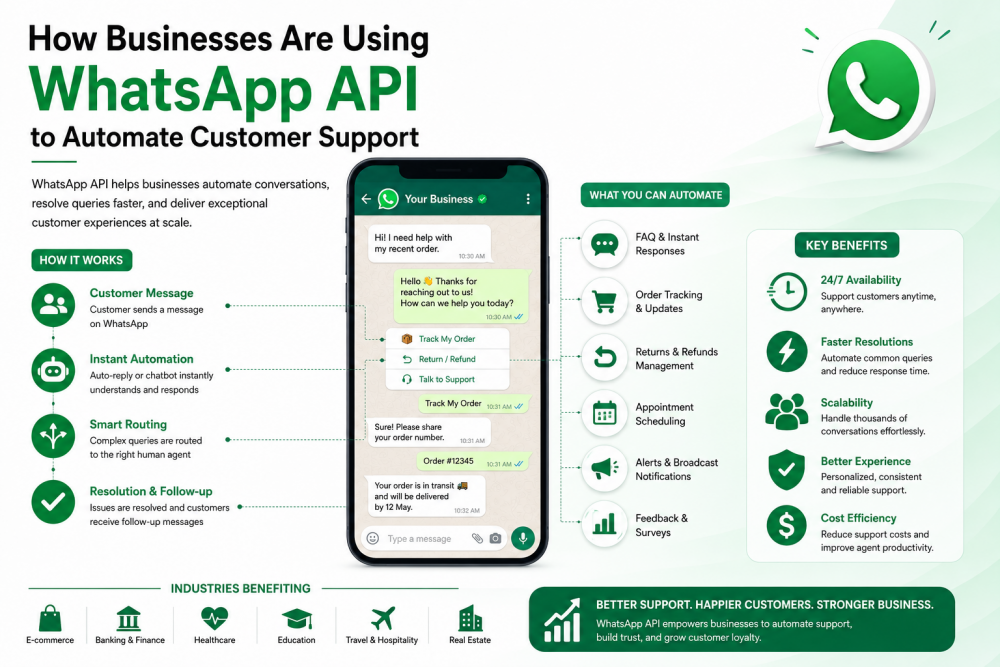
The API is for companies that need to send thousands of messages, trigger them automatically based on system events, and connect WhatsApp into the same stack as their CRM or helpdesk. It is not something you just download and set up in ten minutes. But once it is running, here is what it unlocks:
• Automated messages that fire when something happens in your system, like an order being placed or a payment failing
• Real two-way conversations handled by bots, live agents, or both
• Proper integration with your CRM, ticketing tools, and contact center software
• Pre-approved message templates for reaching out proactively
• Chatbot flows that resolve common issues without a single human getting involved
Handling the ‘Where Is My Order?’ Problem
If you work in e-commerce or logistics, you already know what I am talking about. A huge chunk of support volume, sometimes the majority of it, is customers asking where their order is. It is repetitive, it is predictable, and it absolutely does not need a human being to answer it.
Businesses connecting their order management systems to the WhatsApp API have basically solved this. Customers get automatic updates at every stage: confirmed, packed, shipped, out for delivery, delivered. They never have to reach out because they already have the information.
Companies that have done this right report something like a 30 to 50 percent drop in inbound support contacts. That is not a small number. For a mid-sized e-commerce business, that could mean reassigning agents to work that actually needs them.
Chatbots for the Questions That Come Up Every Single Day
Here is a pattern that plays out in almost every support team I have seen: a huge percentage of queries are the same questions over and over. Business hours, password resets, refund policies, how to track a return. Agents answer these dozens of times a day, and it is nobody’s idea of meaningful work.
WhatsApp chatbots handle this tier really well. A customer sends a message, the bot figures out what they are asking (either through keyword matching or more sophisticated NLP if the setup is advanced), and gives them an answer or walks them through a fix. Usually in under a minute.
The smarter implementations also do a clean handoff. If the bot hits a question it cannot handle, it escalates to a live agent and passes along everything from the conversation so far. The customer does not have to re-explain their situation. That alone saves a lot of frustration on both sides.
Appointment Reminders That Actually Work
No-shows are expensive. Whether you run a clinic, a financial advisory practice, a salon, or any business where time slots have real value, a missed appointment is lost revenue that you cannot get back.
A lot of businesses have started managing bookings entirely through WhatsApp. Clients can schedule, reschedule, or cancel through the chat. Automated reminders go out at 24 hours and again closer to the time. The whole thing runs without anyone on the business side doing anything manually.
The results tend to be pretty consistent: fewer no-shows, fewer missed calls about rescheduling, and staff spending less time on administrative coordination. It is one of those implementations that sounds simple but actually changes how teams spend their day.
Payment Reminders People Actually Read
Email open rates for payment reminders are, frankly, terrible. Most of them go unread or straight to spam. WhatsApp messages get opened. That is just the reality of the channel right now.
Financial services companies and subscription businesses have figured this out. Sending payment reminders, invoices, and overdue notices through WhatsApp gets a response rate that email cannot match. And because it is conversational, customers can reply in the same thread to confirm payment, ask a question, or request a link. No need to call a separate number or log into a portal.
For collections teams, this also creates an auditable trail of every communication, which matters more than people often realize until they need it.
Staying in Touch After the Sale
Most businesses put all their energy into the pre-purchase experience and then go quiet after the order is done. That is a missed opportunity, and customers notice it.
Post-sale WhatsApp messages, usage tips a few days after delivery, a check-in asking if everything went smoothly, a short feedback survey, perform significantly better than email equivalents. People read them. They respond to them. And the ones that do tend to become repeat customers more often.
It is not about bombarding people. One or two well-timed messages after a purchase can do more for customer retention than a lot of expensive marketing campaigns.
Making It All Work Together
Here is where a lot of businesses stumble. They get excited about WhatsApp automation, set it up as a standalone channel, and then realize it is completely disconnected from everything else. Agents cannot see WhatsApp threads in the CRM. Managers cannot report on it. It becomes its own little silo.
The right way to do it is to use a WhatsApp Business API solution that connects natively with your contact center or helpdesk. When that integration is done properly, agents get one inbox for everything: WhatsApp, calls, email. Bots can hand off to humans mid-conversation without losing context. And every interaction flows into your reporting.
It takes more setup upfront. But without it, you are not really automating support, you are just adding another tab for your team to monitor.
A Few Things Worth Knowing Before You Start
Nothing about the WhatsApp API is complicated once it is up and running, but there are a few things that catch people off guard early on.
• Any message you initiate outside of a 24-hour window after a customer last wrote to you has to use a Meta-approved template. The approval process takes time, so factor that into your timeline.
• You need explicit opt-in from customers before you can message them. This is not optional and it is not something to work around. Build opt-in into your checkout flow or onboarding process from the start.
• WhatsApp assigns quality ratings to business accounts based on user feedback. If customers are blocking your messages or marking them as spam, you will notice it in your ratings and eventually in your ability to send.
• You access the API through a Meta-approved Business Solution Provider, not directly from Meta. The provider you choose affects your uptime, support quality, and what integrations are available, so it is worth doing some research before committing.
Where to Start
If you have been sitting on this, the honest advice is to just pick one use case and get it working. Order updates if you are in e-commerce. Appointment reminders if you run a service business. FAQ automation if your support team is drowning in the same questions.
Get that one thing working properly before you try to do everything at once. The integration work is the hard part, and once it is done, expanding to other use cases is much faster. Most businesses that take this approach see results quickly enough that the next use case basically sells itself internally.
The businesses that will struggle are the ones that keep treating WhatsApp as something to consider later. For a large and growing share of customers, it is already the first place they look.