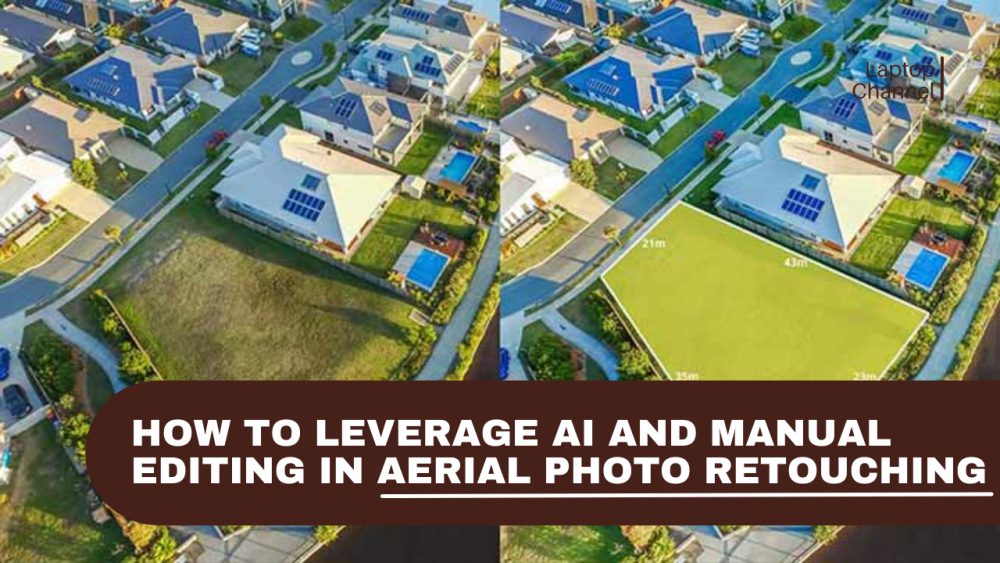
In aerial photo retouching, the ability to balance speed, efficiency, and quality is crucial for businesses that handle large volumes of images. While AI editing offers scalability and faster turnaround times, manual editing remains essential for precision and creative control. The challenge lies in understanding when to rely on AI tools to streamline repetitive tasks and when to leverage manual expertise for high-level, detail-oriented work.
This blog explores the differences between manual and AI aerial photo editing, providing insights into how each method can be strategically applied to meet project requirements, how by effectively combining both, businesses can optimize their editing workflows to achieve both efficiency and accuracy, and how outsourcing to an aerial photo retouching company can provide the infrastructure to handle complex projects while ensuring high-quality, market-ready visuals.
Best Method for Aerial Photo Editing: Manual or AI?
Benefits of AI for Aerial Photo Retouching
- Fast Turnaround at Scale
AI can process large volumes of aerial images quickly, enabling faster time-to-market and helping avoid delays in high-volume projects. This scalability benefits real estate professionals, allowing them to meet tight deadlines, handle seasonal spikes in demand, and efficiently manage multiple listings simultaneously. - Efficiency in Handling Repetitive Tasks
- Sky or Background Replacement
AI can replace dull or overcast skies with dramatic or clear ones and can also change or enhance backgrounds, ensuring consistency across photos. - Object and Clutter Removal
AI tools can automatically identify and remove unwanted objects or distractions like power lines, people, vehicles, or temporary structures, providing clean, professional-looking aerial shots. - Image Upscaling (Super-Resolution)
AI-driven super-resolution technique, converts low-resolution images into high-resolution with added detail and clarity. This is especially valuable for scaling drone images for print, high-resolution displays, or detailed presentations, where fine detail is essential. - Color Enhancement and Grading
AI can automatically enhance or adjust colors to match a specific mood or standard, ensuring consistency in large batches of photos. It can correct any imbalances in saturation, contrast, and vibrancy, particularly useful for aerial shots in varying lighting conditions. - Auto-Cropping and Straightening
AI tools can automatically crop or straighten images to ensure proper alignment, saving time compared to manual adjustments.
- Depth and Focus Adjustment
AI can enhance the perceived depth and focus of an image by adjusting the sharpness and blur in different areas of the image, mimicking the effect of a shallow depth of field in aerial shots. - Image Stitching for Panoramas
For aerial shots taken with multiple frames, AI tools can automatically stitch them together into a seamless panorama, removing any visible seams and blending colors and textures. - Facial or Text Recognition and Highlighting
AI-powered tools can identify faces, text, or logos in images and apply targeted corrections or enhancements, such as blurring or sharpening, based on set parameters. - HDR Blending
AI can automatically blend multiple exposures of the same scene to create an HDR (high dynamic range) image, capturing both highlights and shadows.
- Cost Efficiency for Routine Edits
For basic enhancements, AI reduces dependency on skilled editors, lowering per-image costs.
Limitations of AI-Powered Aerial Photo Retouching
- Lack of Contextual Understanding
AI lacks the ability to fully interpret the context of an image, such as the architectural layout, the relationship between elements in a scene, or the intended focal points. For example, in aerial real estate photos, AI might mistakenly adjust the color of the sky in a way that makes the property appear unnatural, or it might fail to properly align or crop the property boundaries. It may also misplace or distort features like roofs or landscaping, making them look out of proportion, because the system doesn’t fully understand the spatial relationships and visual intent within the scene. - Inconsistent Results in Complex Scenes
It struggles with complex lighting scenarios, such as shadows from tall buildings, reflective surfaces, or water bodies. Dense vegetation and intricate architectural details may also confuse automated models, leading to less realistic or inconsistent results. - Artifacts and Unnatural Textures
While AI can improve sharpness or upscale images, it may introduce visible artifacts like over-smoothing, halo effects, or color banding, especially in less-than-ideal conditions. These imperfections can make aerial images look artificial and detract from realism. - Limited Control Over Fine Details
AI tools are not yet capable of handling intricate tasks like selective object removal, boundary cleanup, or precision masking. It require manual expertise for subtle edits, such as seamless integration of complex elements or exact color grading.
Benefits of Manual Editing for Aerial Photo Retouching
- Complex Object Removal and Scene Reconstruction
AI can handle basic object removal (e.g., dust spots, power lines), but tasks like removing large objects (e.g., cranes, construction sites, trees blocking views) require manual editing. AI struggles to fill in gaps seamlessly, making human intervention necessary for realistic reconstruction. - Texture Retouching and Detail Refinement
AI can sometimes produce artificial results in detailed texture editing (e.g., smoothing rough surfaces or creating consistent textures). Manual editing is crucial for maintaining natural textures, especially in high-quality images where authenticity is critical. - Branding and Visual Identity Alignment
AI cannot incorporate custom branding elements like specific colors, logos, or themes. Tailoring images to a client’s unique branding and marketing requirements demands human judgement to ensure alignment with visual identity. - Regional or Regulatory Compliance
Photo editing with AI cannot account for local regulations or legal standards (e.g., Health Insurance Portability and Accountability Act (HIPAA) for healthcare or General Data Protection Regulation (GDPR) for data protection). Manual editing ensures images comply with specific regulatory requirements, such as the removal of sensitive information, safeguarding individual privacy, and ensuring alignment with legal standards. - Restoration of Damaged or Low-Resolution Images
AI can enhance low-resolution or damaged images to a degree, but full restoration — such as repairing pixelated sections, recovering missing areas, or recreating details — requires manual editing. - Precise Masking for Complex Background Removal
AI handles simple background removal but struggles with intricate details or mixed backgrounds (e.g., removing clouds without affecting buildings). Manual masking is required for complex edges and transitions, ensuring a clean and seamless output.
Limitations of Manual Photo Editing
- Increased Turnaround Time
Detailed retouching requires skilled editors and cannot match AI processing speed for high-volume projects. - Higher Cost
Manual editing is generally more expensive due to high labor costs, time consumption, and the need for skilled professionals, particularly for large-volume or complex projects. - Limited Scalability
Managing thousands of images manually requires structured teams and quality control processes.
Manual Editing vs AI Editing Framework in Aerial Photo Retouching
When to Choose AI Tools for Aerial Photo Retouching
| Use-Case | Why AI Editing is Ideal |
| High-Volume Projects | Ideal for processing large batches of images efficiently, providing fast turnaround without compromising speed. |
| Standard Lighting Conditions | Best suited for images captured under consistent, uniform lighting (e.g., daylight) with minimal need for adjustments. |
| Basic Editing Tasks | Perfect for fundamental edits such as color correction, exposure adjustments, and sharpening, where fine detail accuracy is not critical. |
| Budget-Constrained Projects | Provides a cost-effective solution when fine detail accuracy is not a priority, offering faster results at a reduced cost. |
When to Choose Manual Editing for Aerial Photo Retouching
| Use-Case | Why Manual Editing is Ideal |
| Premium or High-Stakes Projects | Essential for high-quality, detailed edits needed for premium real estate listings, investor presentations, or high-end marketing materials. |
| Complex Lighting or Scene Elements | Critical when working with images that include complex shadows, reflective surfaces, or mixed lighting that require expert oversight to ensure realism. |
| Compliance and Legal Requirements | Required when images must meet legal or regulatory standards (e.g., HIPAA, GDPR) and must maintain high levels of accuracy, especially in regulated industries. |
| Custom Edits and Detailed Refinements | Necessary for intricate adjustments, such as object removal, boundary refinement, and other complex edits that demand human expertise for seamless integration. |
The Hybrid Approach: Combining Manual Editing and AI Editing
Step 1: AI-Driven Pre-Editing
- Task: Use AI to automate repetitive tasks such as exposure correction, color adjustments, sky replacement, and noise reduction for large batches.
- Objective: Increase efficiency and consistency across images.
Step 2: Manual Review and Refinement
- Task: Human editors review AI-edited images, correcting imperfections like over-enhancement, unnatural textures, misalignment and refine shadows, highlights, and composition.
- Objective: Ensure images align with the creative vision and client requirements.
Step 3: Custom Manual Adjustments
- Task: Perform object removal, boundary refinements, and complex masking for precision and seamless integration.
- Objective: Address intricate details AI can’t handle with the same level of accuracy.
Step 4: Final AI Enhancements
- Task: Apply final batch corrections for consistency, including color grading and sharpening.
- Objective: Ensure uniform quality across the entire image set.
Step 5: Quality Control and Delivery
- Task: Conduct a final manual quality check to ensure images meet high standards of realism, brand consistency, and regulatory compliance.
- Objective: Prepare images as market-ready visuals, ensuring they align with project specifications and are suitable for distribution.
End Note
The debate around manual editing vs AI editing is not about choosing sides. It is about choosing the right tool for the right task. AI accelerates workflows and reduces costs, while manual editing ensures precision, realism, and trust.
In-house photo retouching often falls short when it comes to handling large-scale, complex projects due to a lack of specialized infrastructure, advanced workflows, and scalable resources. Partnering with aerial photo retouching services, provides access to domain-expertise, cutting-edge tools, and specialized processes, enabling them to deliver superior results with unmatched efficiency and precision.
Nathan Neal is a seasoned photo editing and retouching expert at PicsMatic, a leading photo editing company. With a versatile skill set encompassing fashion photo retouching, portrait enhancement, real estate HDR photo editing, and 3D modeling, he brings extensive expertise to each project. His creative prowess is warranted through a portfolio of over 10,000 edited photos, catering to a diverse array of brands and businesses, from startups to global conglomerates across various industries. Committed to excellence, Nathan keeps himself updated with the latest trends and practices in the photo editing industry.