TL;DR
- Backup restore and database recovery are not the same thing
- Backups fail more often than organizations expect
- Corruption and ransomware frequently spread into backups
- Recovery focuses on data integrity, not just availability
- Enterprises need both backups and recovery expertise
Introduction: The Backup Myth in Modern Database Failures
Most organizations believe one thing with absolute confidence:
“We’re safe because we have backups.”
That belief is often the first thing that collapses during a real incident.
When a database fails due to corruption or ransomware, teams attempt a restore. Sometimes it works. Very often, it doesn’t. Backups fail to restore, restore partially, or bring the same corruption back into production.
This is where confusion begins.
Database recovery and backup restoration are often treated as interchangeable. They are not. They solve different problems, operate at different layers, and succeed under very different conditions.
Understanding the distinction is critical. It is often the difference between a quick recovery and days of escalating downtime.
This article explains why backups alone are insufficient in many modern database incidents, and when database recovery in India becomes the only viable path forward.
For enterprise environments, these scenarios are handled through controlled recovery workflows similar to those used by AS Data Recovery when backups fail or cannot be trusted.
What Backup Restore Is Designed to Do
Backup restore is a replacement mechanism.
It assumes:
- The backup is clean
- The backup is complete
- The backup is compatible
- The corruption occurred after the backup was taken
When these assumptions hold true, restore is fast and effective.
Backup restore works best for:
- Accidental deletions caught early
- Hardware failures with intact backups
- Clean rollbacks after failed updates
- Non-malicious outages
In these cases, restoring from backup is absolutely the correct approach.
Where Backup Restore Breaks Down
Backups fail not because the technology is bad, but because reality is messy.
1. Corruption Exists Inside the Backup
Database corruption is often silent.
It can exist for days or weeks before symptoms appear. During that time, corrupted pages, indexes, or metadata are backed up repeatedly.
When you restore:
- The database comes back online
- The same corruption resurfaces
- The same errors reappear
At this point, backups are no longer a solution. They are part of the problem.
2. Ransomware Reaches the Backup Layer
Modern ransomware is backup-aware.
Attackers actively target:
- Backup servers
- Network-attached backup storage
- Snapshot catalogs
- Backup credentials
When backups are encrypted or deleted, restore is no longer an option.
Even worse, some restores reintroduce malware or ransomware artifacts back into clean environments.
3. Backup Restore Completes but Data Cannot Be Trusted
A restore that “works” is not always a restore that is safe.
Common post-restore issues include:
- Missing records
- Broken relationships
- Incorrect transaction states
- Inconsistent reporting results
These issues often surface days later, after business operations resume. At that point, identifying what was lost becomes extremely difficult.
4. Backup Compatibility and Version Conflicts
Database restores can fail due to:
- Version mismatches
- Engine changes
- Platform migrations
- Schema drift
A backup taken on one version or configuration may not restore cleanly on another, especially after upgrades or environment changes.
What Database Recovery Solves That Backups Cannot
Database recovery is not replacement.
It is reconstruction and validation.
Recovery focuses on:
- Extracting usable data
- Repairing internal structures
- Rebuilding databases safely
- Validating integrity before reuse
It is used when backups are missing, unusable, or untrustworthy.
How Database Recovery Works When Restore Fails
1. Data Preservation Comes First
Original data is preserved exactly as-is. No overwrite. No destructive repair.
2. Damage Is Isolated
Corrupted structures are identified and separated from intact data.
3. Data Is Reconstructed
Tables, records, and relationships are rebuilt using database-engine-specific knowledge.
4. Integrity Is Verified
Recovered data is validated structurally and logically before reintroduction.
This process is slower than restore, but significantly safer in complex incidents.
Backup Restore vs Database Recovery (Clear Comparison)
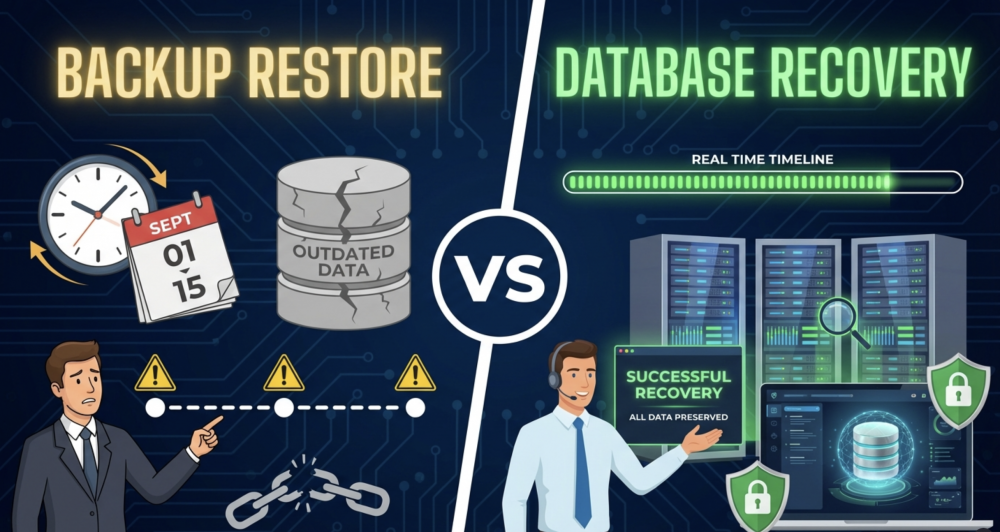
Backup Restore
- Fast
- Automated
- Assumes clean backups
- Fails when corruption predates backup
- Vulnerable to ransomware
Database Recovery
- Controlled and forensic
- Works without backups
- Handles corruption and ransomware
- Requires expertise
- Focuses on data trust
They are complementary, not competing.
Why Ransomware Changes the Equation Completely
Ransomware exposes the biggest weakness of backup-only strategies.
Even when backups exist:
- They may be encrypted
- They may be incomplete
- They may be outdated
- They may reintroduce malware
This is why ransomware incidents often escalate into complete recovery scenarios, where recovery sources must be discovered rather than assumed.
In these cases, recovery may involve:
- Isolated backups
- Replica lag
- Cloud snapshots
- Archived backups
- Partial data extraction
This approach aligns with ransomware complete recovery, not traditional restore workflows.
When Backup Restore Is Still the Right Choice
Backup restore remains ideal when:
- Backups are recent and verified
- Corruption is clearly recent
- No ransomware is involved
- Integrity checks pass post-restore
The mistake is not using backups.
The mistake is assuming backups always work.
When Database Recovery Is Non-Negotiable
Database recovery should be used when:
- Restores fail or loop
- Corruption predates backups
- Ransomware is confirmed
- Data integrity cannot be verified
- Compliance or audit risk exists
At this stage, speed matters less than correctness.
Designing a Strategy That Uses Both
Mature organizations plan for restore first, recover when needed.
Best practices include:
- Immutable backups
- Regular restore testing
- Backup isolation
- Recovery playbooks
- External recovery readiness
This hybrid strategy dramatically reduces downtime and data loss.
Final Thoughts
Backups are essential.
They are not sufficient.
Modern database failures are complex, multi-layered, and often adversarial. When restore assumptions fail, recovery becomes the only path forward.
Understanding this distinction before an incident occurs is one of the most valuable decisions an organization can make.